
NEWS
Information regarding MUSIC NATION SMTOWN META-PASSPORT
2023/01/25
We will be holding a MUSIC NATION SMTOWN META-PASSPORT booth at the “KAI Japan Special Live 2023” venue, which will be held from Saturday, January 28, 2023.At our booth, we are offering a digital switching service for those who have an existing MUSIC NATION SMTOWN PASSPORT.
If you would like to switch to digital stamps, please take this opportunity to stop by our booth!
With the newly created META-PASSPORT app, you can digitally record original stamps of each performance by attending SM Entertainment artists' live performances and events!
Please download the META-PASSPORT app and create your own original passport ♪
Please note that the method for obtaining digital stamps has changed due to an app update.
<Before change>
Scan the QR code displayed on the monitor in the booth to get a digital stamp.
↓
<After change>
Launch the META-PASSPORT app inside the venue and authenticate your location to obtain a digital stamp.
With the update, you can now get digital stamps anywhere in the venue without having to come to the booth.
For more information, please check the information below.
Please update the SMTOWN META-PASSPORT app before visiting.
[Nagoya venue]
・Booth location
Nagoya Congress Center Hall SMTOWN META-PASSPORT Management Booth
・Booth operation date and time
▶ January 28, 2023 (Sat) 14:00-18:00
*The above dates and times are subject to change depending on venue circumstances.
[Osaka venue]
・Booth location
ORIX THEATER SMTOWN META-PASSPORT management booth
・Booth operation date and time
▶ January 29, 2023 (Sunday) 13:00-17:00
*The above dates and times are subject to change depending on venue circumstances.
[Yokohama venue]
・Booth location
Pacifico Yokohama National Hall SMTOWN META-PASSPORT Management Booth
・Booth operation date and time
▶ January 31, 2023 (Tuesday) 12:00-17:00
*The above dates and times are subject to change depending on venue circumstances.
[Booth operation details]
1. MUSIC NATION SMTOWN PASSPORTdigital switching authentication
MUSIC NATION SMTOWN PASSPORT has been reborn as [META-PASSPORT]!
Currently, for those who have a MUSIC NATION SMTOWN PASSPORT issued after 2012.
We provide a service to migrate existing stamps to digital stamps.
Please check the following for detailed authentication methods and try out the digital version of [META-PASSPORT].
*Authentication method
Please come to the MUSIC NATION SMTOWN META-PASSPORT management booth and present your MUSIC NATION SMTOWN PASSPORT to the staff.
Please log in to SMTOWN from the URL below and after confirming your account, we will switch from existing stamps to digital stamps.
Click here to log in to your SMTOWN account▼
https://www.smtown.com/account/login
*Notes
- Stamp switching will be done at the "SMTOWN META-PASSPORT" booth for each offline performance.
We will inform you about whether the booth will be operated or not and details for each performance.
- Please note that you may have to wait depending on the time required for authentication and the number of booth users.
Additionally, because the number of people who can authenticate during booth operating hours is limited, registration may end early even during business hours. Please note.
- You can log in to the META-PASSPORT service using your SMTOWN account. You cannot register as a member with META-PASSPORT, so please register as a member of SMTOWN before using it.
- If you do not have an SMTOWN account, you can use it after registering as a member.
Please register as a member from the URL below.
https://www.smtown.com/account/login
- You can only authenticate once per person. Once authentication is complete, additional authentication cannot be performed, so if you have multiple MUSIC NATION SMTOWN PASSPORTs, please present all of them so that they can be authenticated at once.
- If you forget your actual MUSIC NATION SMTOWN PASSPORT, we will not be able to authenticate it for any reason, so please be aware of this before coming to the venue.
- If the passport number and barcode number of MUSIC NATION SMTOWN PASSPORT cannot be identified, authentication cannot be performed.
- Only official stamps stamped on MUSIC NATION SMTOWN PASSPORT can be switched.
-Regardless of the number of times you have watched the performance, if it is the same performance, you will receive one representative stamp. However, even if it is the same performance, if it is in a different country or region, we will switch to the digital stamp for each performance.
- Please note that certified MUSIC NATION SMTOWN PASSPORTs will be returned with a hole punched in them.
- You can check the switched stamps on "SMTOWN > MY PAGE" and "SMTOWN META-PASSPORT" mobile app.
2. DIGITAL STAMPacquisition of
The existing stamps will be replaced with digital stamps, and you will be able to get stamps for each offline performance.
Select the app camera (stamp MARK) on the META-PASSPORT app, authenticate your location information, and receive your digital stamp.
*Please enable the use of location information services on your smartphone before using this service.
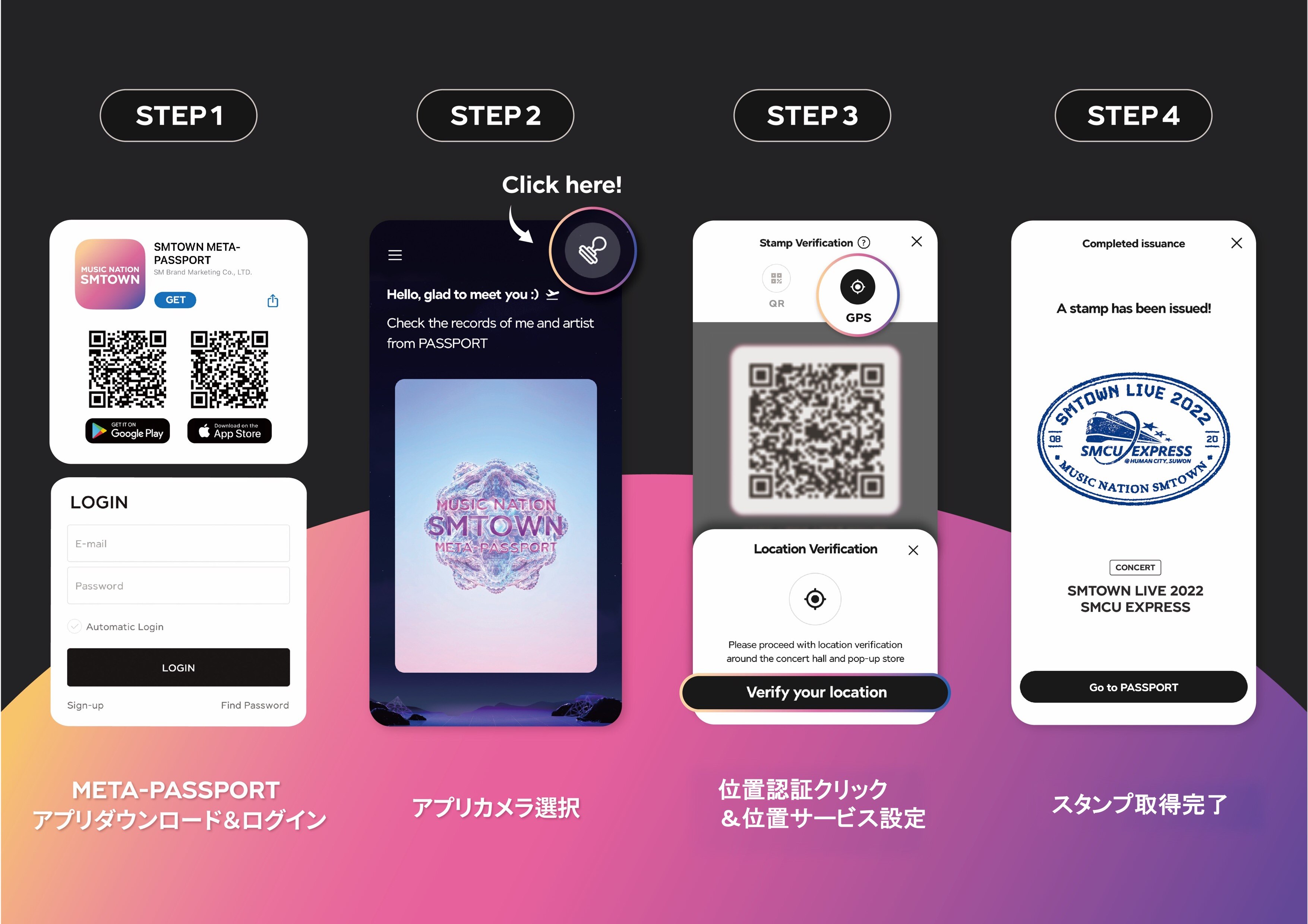
[デジタルスタンプ取得の流れ]
Step1. 「SMTOWN META-PASSPORT」アプリをダウンロードし、SMTOWNアカウントでログイン
ダウンロードはこちら▼
App Store (iOS) https://bit.ly/AppStore_META-PASSPORT
Google Play (Android) https://bit.ly/META-PASSPORT
Step2. アプリのメイン画面右上のスタンプマークを押す
Step3. 位置認証(GPS)マークを押して、位置情報サービスの使用を許可
Step4. スタンプの受け取り完了!
受け取ったデジタルスタンプは、ホーム画面のパスポートをタップしてご確認いただけます。
[MUSIC NATION SMTOWN META-PASSPORTに関するお問い合わせ]
お問い合わせ先:metahelp@smtown.com
*本件に関して、EXOオフィシャルホームページやオフィシャルファンクラブ「EXO-L-JAPAN」、または会場へお問い合わせいただいてもご対応いたしかねます。