
NEWS
Information regarding MUSIC NATION SMTOWN META-PASSPORT
2023/04/14
MUSIC NATION SMTOWN META-PASSPORT digital stamp service will be implemented at the venue of “EXO-L-JAPAN presents EXO CHAN NEL “THE BEST”” to be held on Saturday, April 15th and Sunday, April 16th, 2023. .With the MUSIC NATION SMTOWN META-PASSPORT app, you can digitally record original stamps of each performance by attending SM Entertainment artists' live performances and events!
Please download the SMTOWN META-PASSPORT app and create your own original passport ♪
[DIGITAL STAMPService performance]
・April 15th (Sat) and 16th (Sun) 2023 @ Belluna Dome
※Notes
- Please check the KWANGYA CLUB and SMTOWN announcement pages for the time and location where you can obtain digital stamps.
- There will be no MUSIC NATION SMTOWN META-PASSPORT booth at the above venue.
Please note that the existing MUSIC NATION SMTOWN PASSPORT digital switching service and physical stamps will not be provided.
- The future MUSIC NATION SMTOWN PASSPORT digital switching service will be announced later on the KWANGYA CLUB and SMTOWN announcement pages.
<MUSIC NATION SMTOWN>
https://www.smtown.com/notice
<Click here to download the KWANGYA CLUB app>
App Store (iOS) https://bit.ly/AppStore_KWANGYACLUB
Google Play (Android) https://bit.ly/GooglePlay_KWANGYACLUB
Please note that the method for obtaining digital stamps has changed due to an app update.
<Before change>
Scan the QR code displayed on the monitor in the booth to get a digital stamp.
↓
<After change>
Launch the SMTOWN META-PASSPORT app inside the venue and authenticate your location to obtain a digital stamp.
With the update, you can now get digital stamps anywhere in the venue without having to come to the booth.
For more information, please check the information below and update the SMTOWN META-PASSPORT app before visiting.
[DIGITAL STAMP[obtain]
You can get a digital stamp for each offline performance.
Select the app camera (stamp MARK) on the SMTOWN META-PASSPORT app, authenticate your location information, and receive your digital stamp.
*Please enable the use of location information services on your smartphone before using this service.
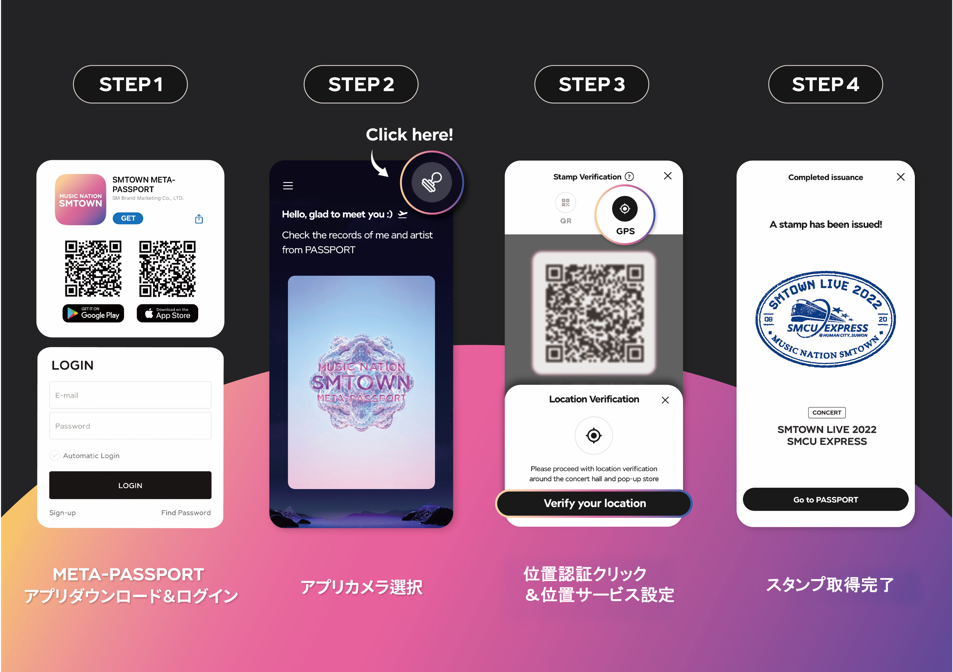
[デジタルスタンプ取得の流れ]
Step1. 「SMTOWN META-PASSPORT」アプリをダウンロードし、SMTOWNアカウントでログイン
ダウンロードはこちら▼
App Store (iOS) https://bit.ly/AppStore_META-PASSPORT
Google Play (Android) https://bit.ly/META-PASSPORT
Step2. アプリのメイン画面右上のスタンプマークを押す
Step3. 位置認証(GPS)マークを押して、位置情報サービスの使用を許可
Step4. スタンプの受け取り完了!
受け取ったデジタルスタンプは、ホーム画面のパスポートをタップしてご確認いただけます。
[MUSIC NATION SMTOWN META-PASSPORTに関するお問い合わせ]
お問い合わせ先:metahelp@smtown.com
*本件に関して、EXOオフィシャルホームページやオフィシャルファンクラブ「EXO-L-JAPAN」、または会場へお問い合わせいただいてもご対応いたしかねます。